helloo Desk Support that clients can actually follow
helloo Desk — Every request handled. Every hour accounted for.
helloo Desk is the ticket system where your clients ask for help, your team gets the work done on a live board, and everyone can see exactly where things stand. No more chasing updates through email.
Invite-only workspace. Your project manager or company admin sends your invitation.
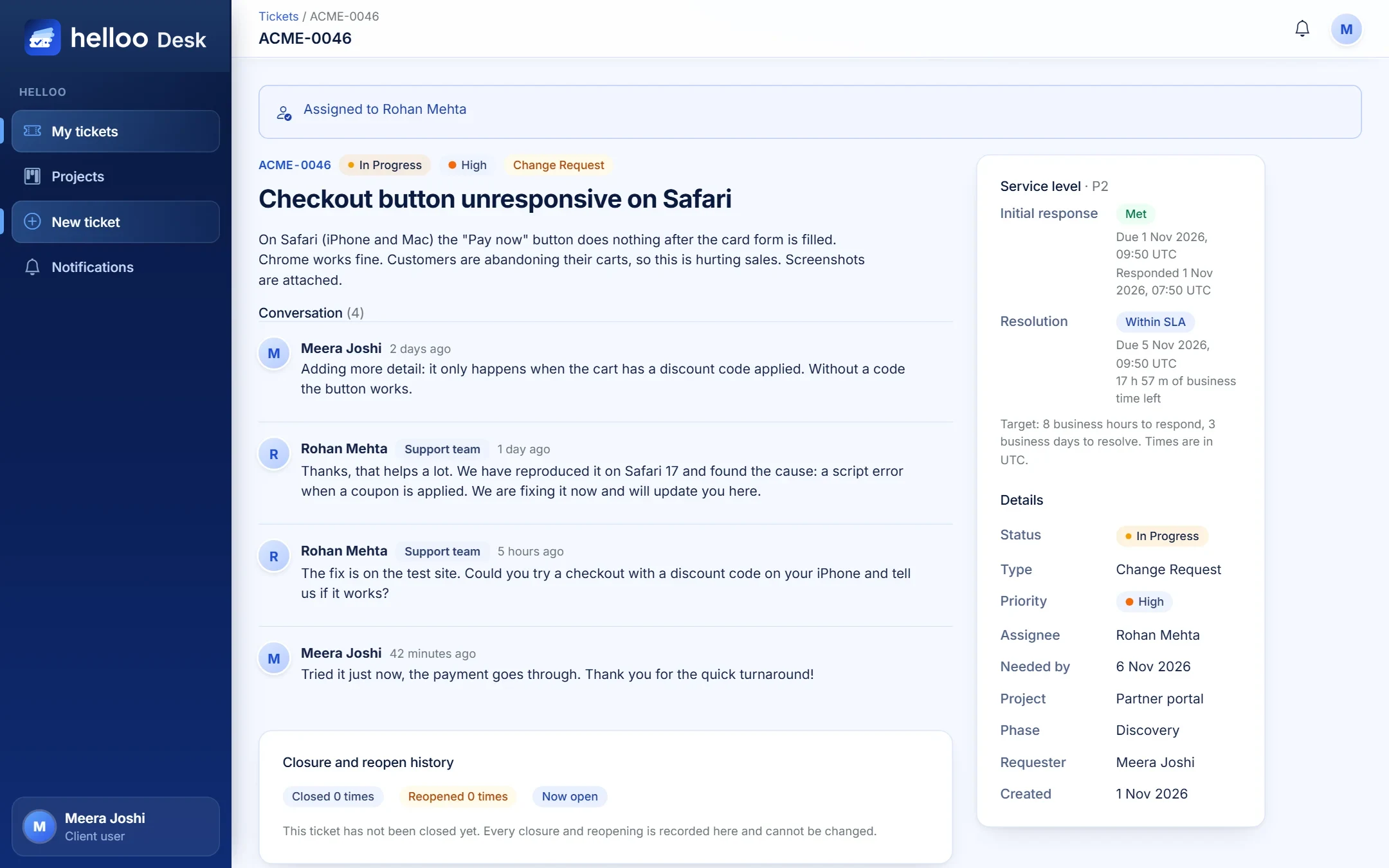
Ticket ACME-0046Fix confirmed by the client
Within service level23 h of business time left
3.5 h logged todayTime log saved
helloo / desk
ACME-0046Checkout button unresponsive on SafariIn ProgressGLBX-0057Cannot change the delivery addressNewACME-0017Contact form lands in spamAssignedUMBR-0112Wrong units on the lab results pageReviewHOOL-0074Update team page photosClosedINIT-0031Add a CSV export to the orders tableIn ProgressSTRK-0096Android back button exits the appAssignedWAYN-0192Calendar invite has the wrong time zoneClosedACME-0046Checkout button unresponsive on SafariIn ProgressGLBX-0057Cannot change the delivery addressNewACME-0017Contact form lands in spamAssignedUMBR-0112Wrong units on the lab results pageReviewHOOL-0074Update team page photosClosedINIT-0031Add a CSV export to the orders tableIn ProgressSTRK-0096Android back button exits the appAssignedWAYN-0192Calendar invite has the wrong time zoneClosed
0roles, each seeing only what they need
0ticket types: issue, request, change
0service levels (P1 to P4) with live timers
0tickets ever deleted. Full history, always
Why helloo Desk
Work gets lost in inboxes. Not here.
When requests live in email threads and chat messages, nobody knows what is open, who owns it or how long it took. helloo Desk gives every request one home.
Without a system
“Did anyone reply to Priya’s email from Tuesday?”
Clients ask for status because they cannot see it
Hours are guessed at month-end, then argued about
Urgent and trivial requests look the same
Nobody notices a deadline until it is already missed
With helloo Desk
One ticket per request, with a clear owner
Clients follow progress themselves, in plain language
Time is logged while the work happens
Priorities with colours and service-level timers
Warnings before a deadline slips, not after
How it works
From “something is wrong” to “all fixed” in five steps
Follow one ticket from the first request to the final report.
1
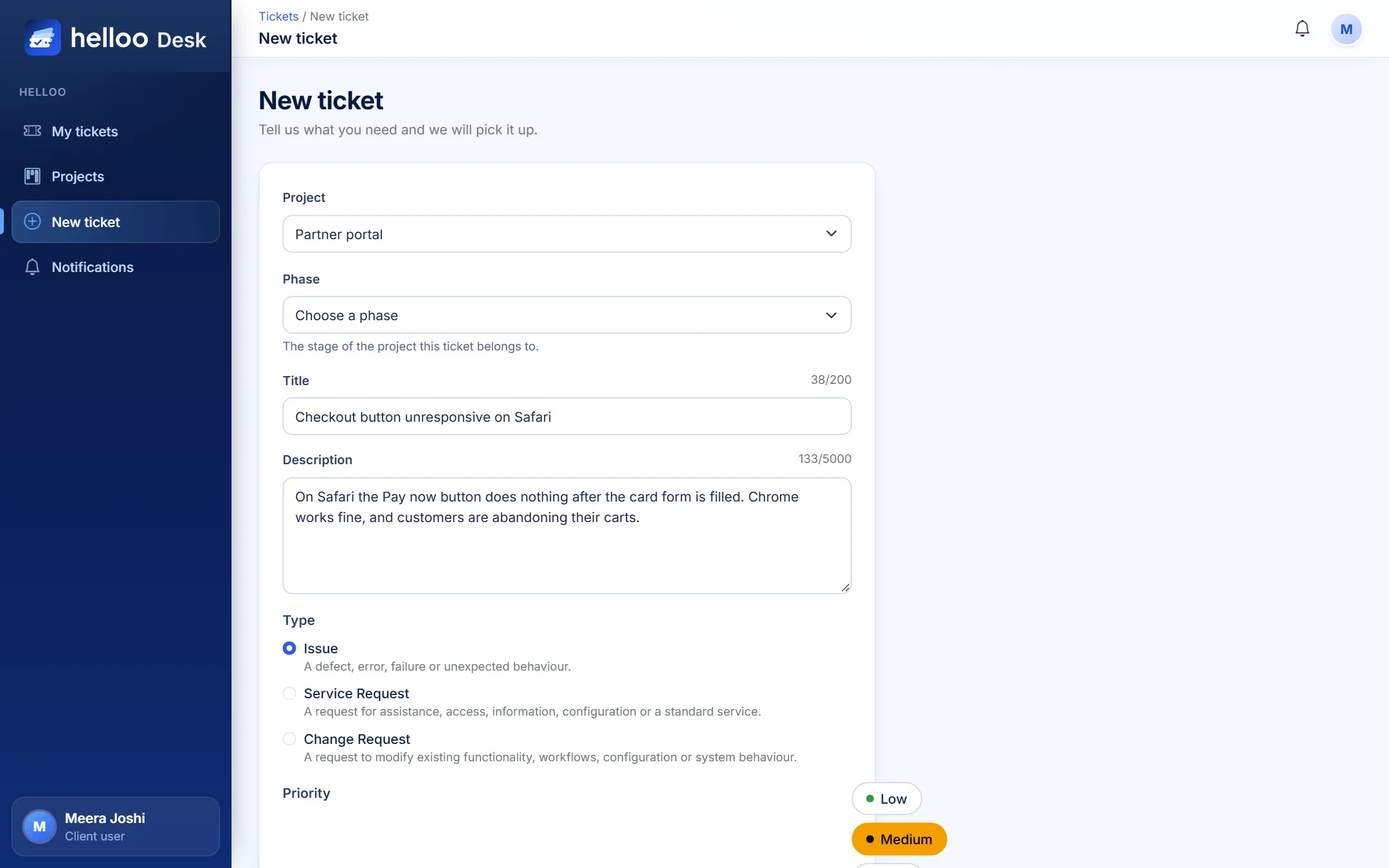
Clients raise it in a minute
A short form asks for what the team really needs: the project, what kind of request it is, how urgent, and by when. Screenshots and documents drag straight in.
Issue, service request or change request
Priority levels set up per project
A confirmation email arrives straight away
2
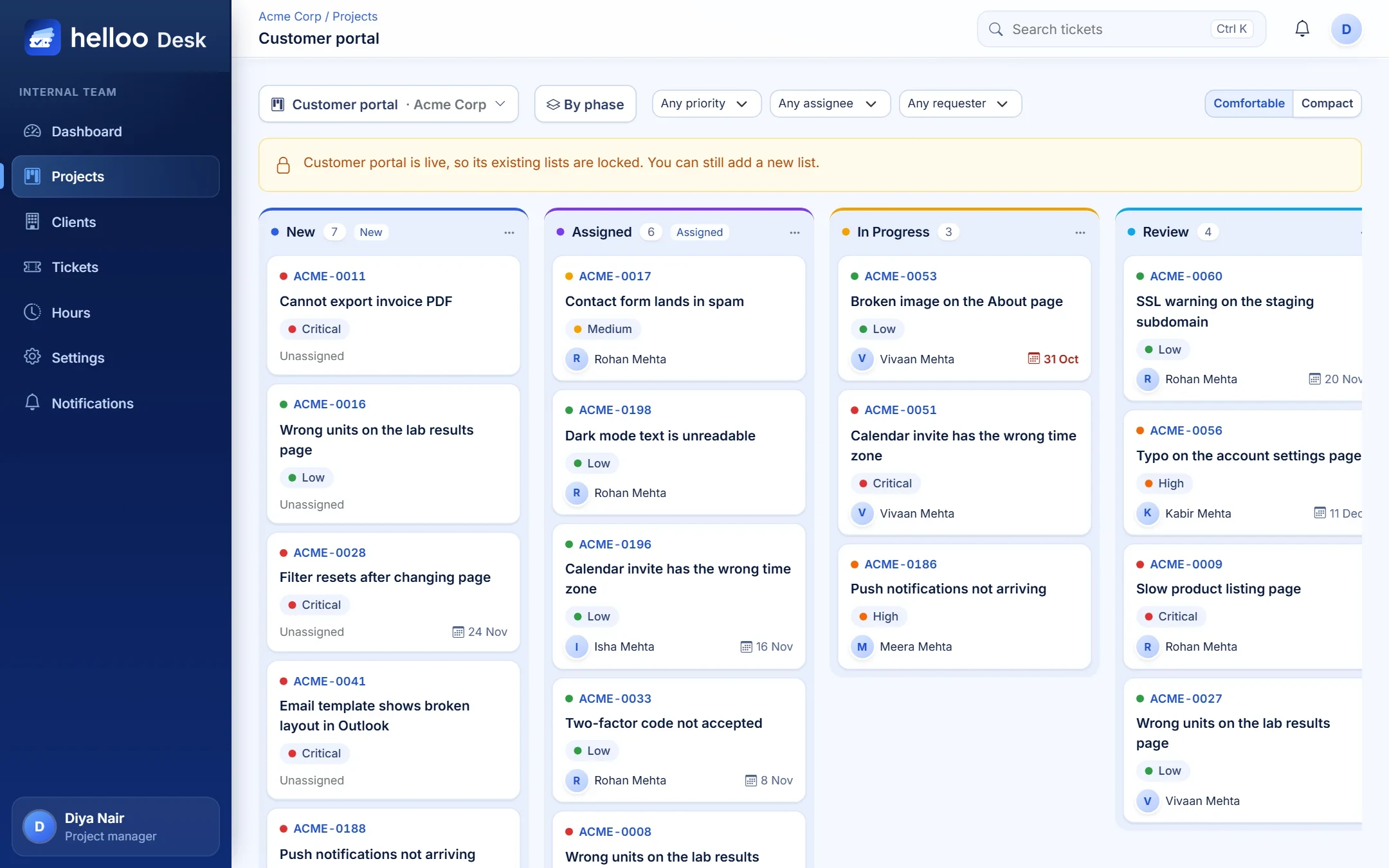
Your team triages on a live board
New tickets land in the first column. Project managers assign people, drag cards across lists and see at a glance what is overdue. Every ticket number is unique per client.
Drag and drop, with keyboard and touch alternatives
Six-second undo if a card lands in the wrong place
Filter by priority, assignee or requester
3
Work, talk and log time in one place
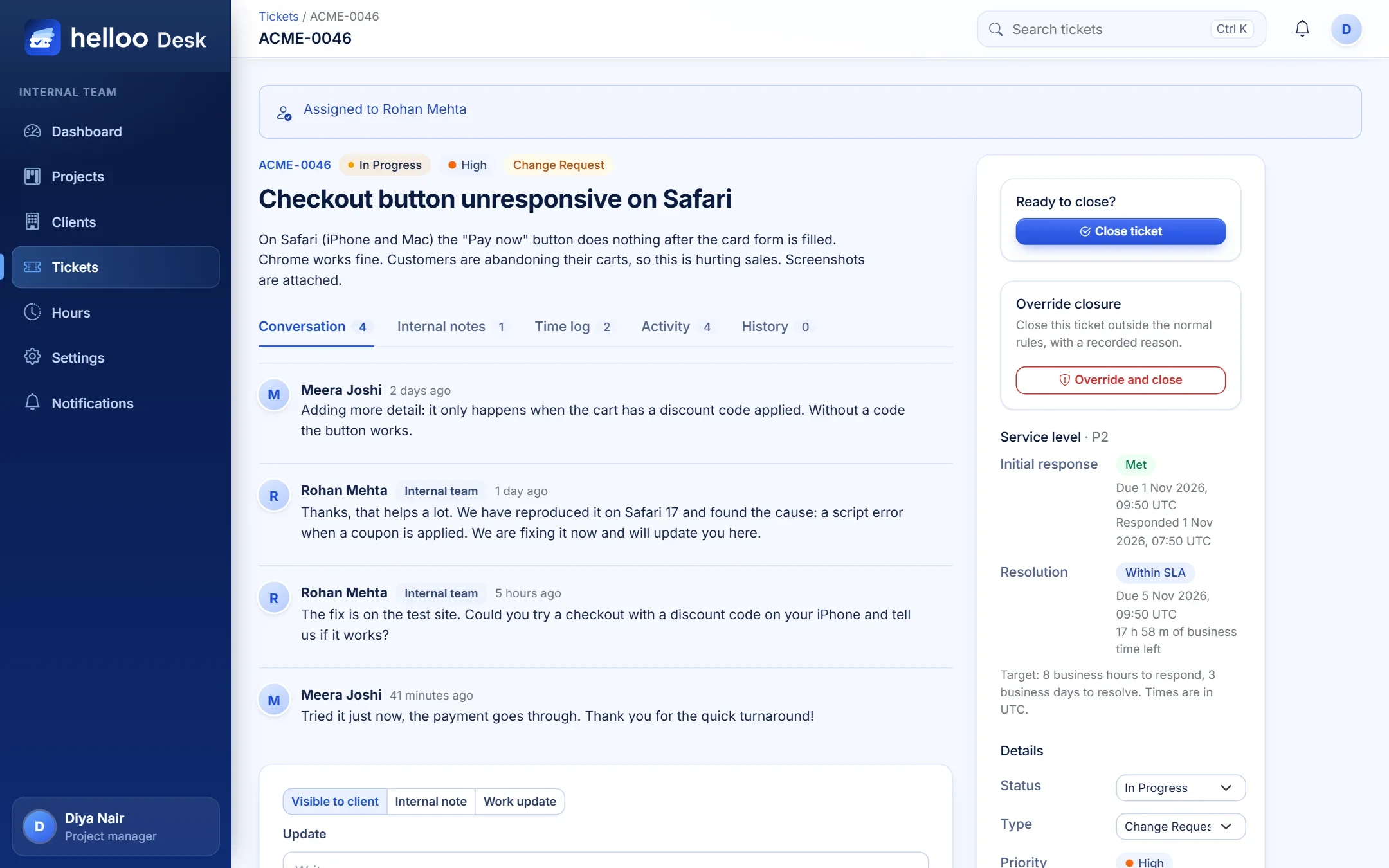
Consultants reply to the client, jot down internal notes the client never sees, and log the time they spent, all from the same screen.
Three clear actions: send, save note, work update
A one-click guard so a double click saves once
A ticket closes only when everyone has logged their time
4
Clients see progress, not the noise
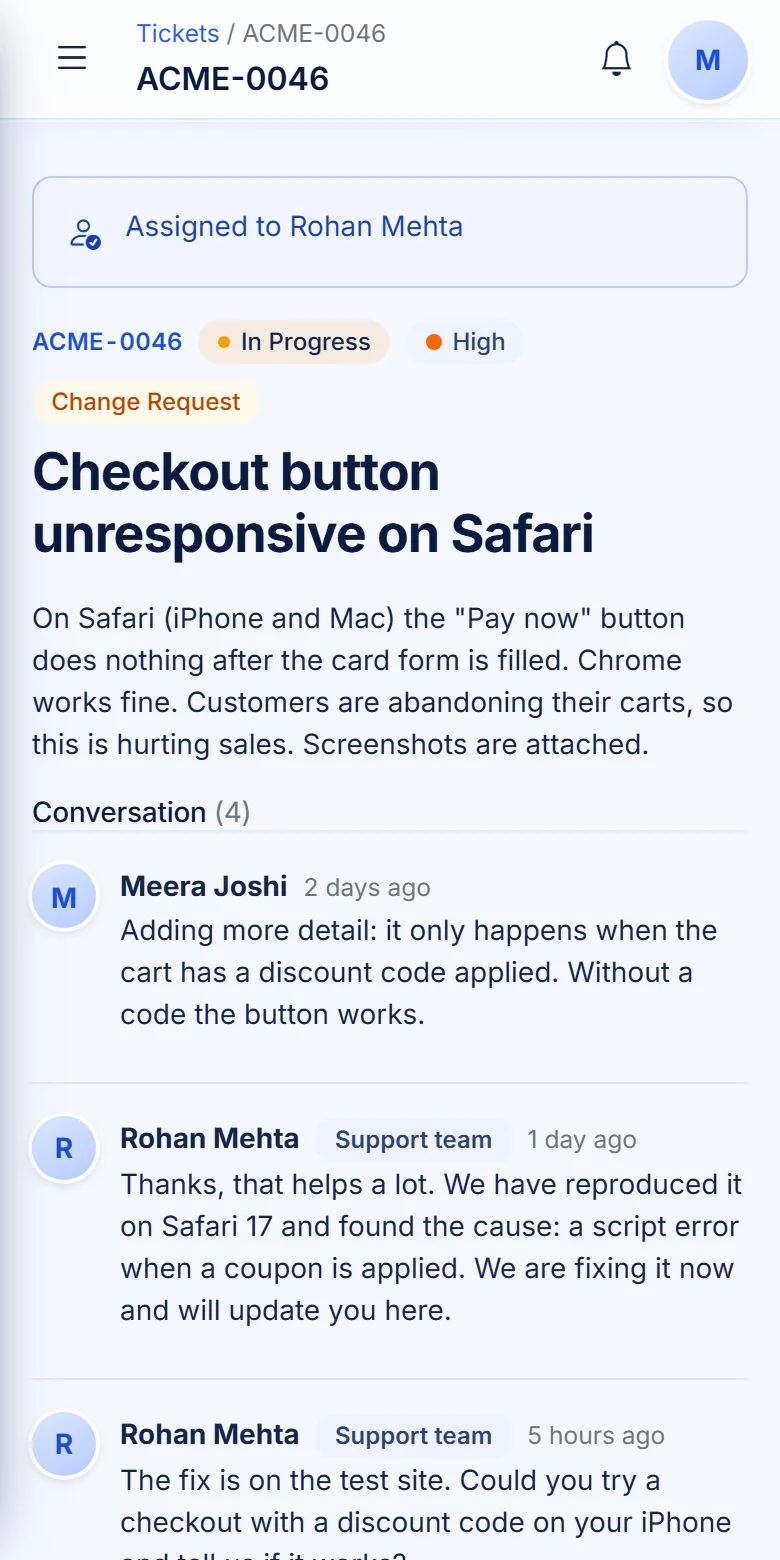
The client’s view shows the conversation, the status, who is on it and how the service-level clock is doing. Internal notes, staff emails and time comments stay hidden.
Hidden by the database query, not just the page
Email and in-app notifications on every public reply
Not happy with a fix? Ask to reopen with a reason
5
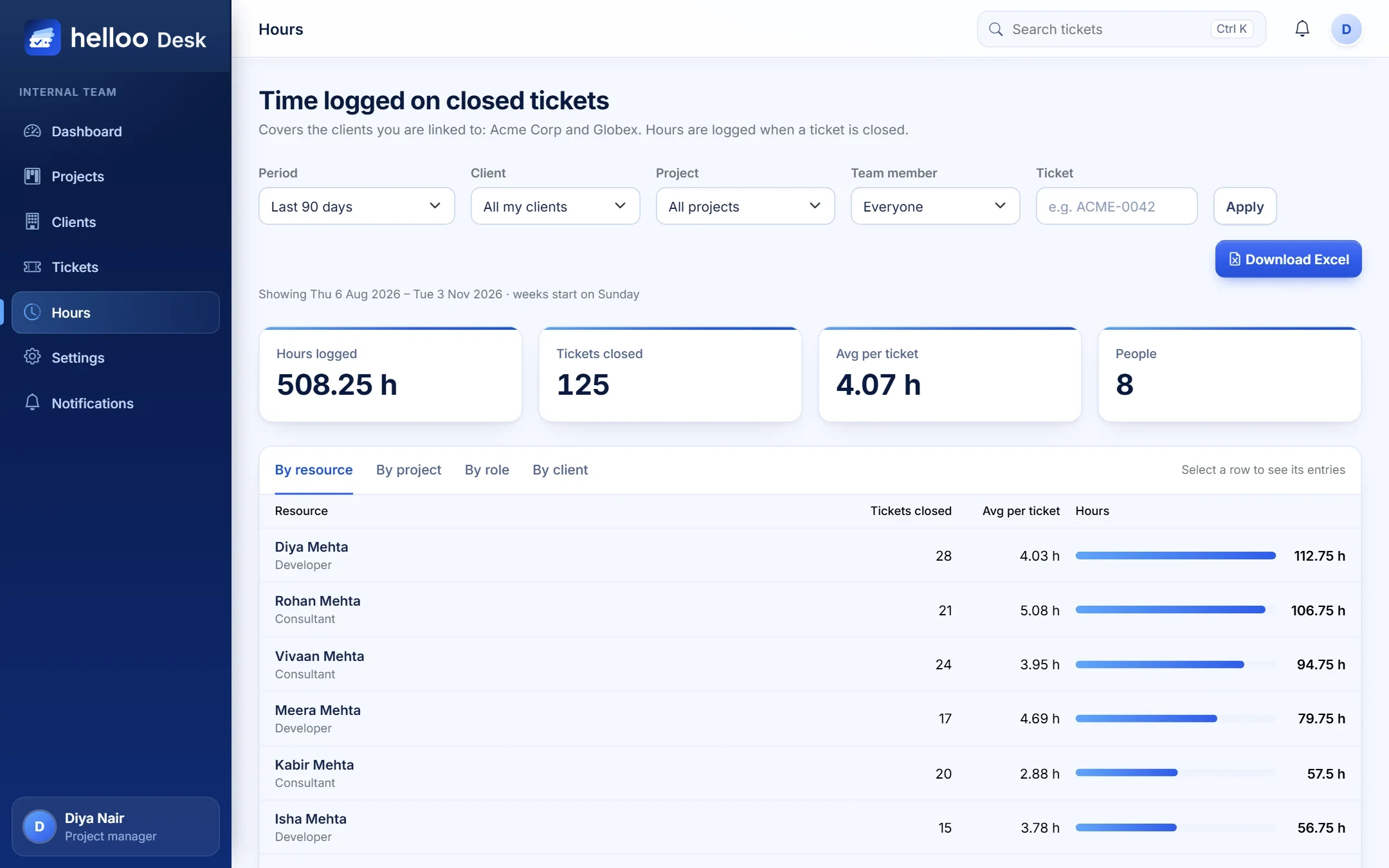
Hours and service levels report themselves
Every logged hour rolls up by person, project, role and client. Pick a period, download an Excel file and you are done. No month-end spreadsheet hunt.
This month, last month, last 90 days or a custom range
Excel export with a summary sheet
Share hours with clients when you choose to
helloo / desk
The ticket path
A clear path every ticket follows
Every ticket moves through the same stages, so nothing sits in limbo and everyone knows what comes next.
New
The client raises a ticket and gets a confirmation.
Assigned
A project manager picks the people and the lead.
In progress
Work happens, replies go out, time is logged.
Review
A quick check before the client hears “done”.
Closed
A resolution note explains exactly what was fixed.
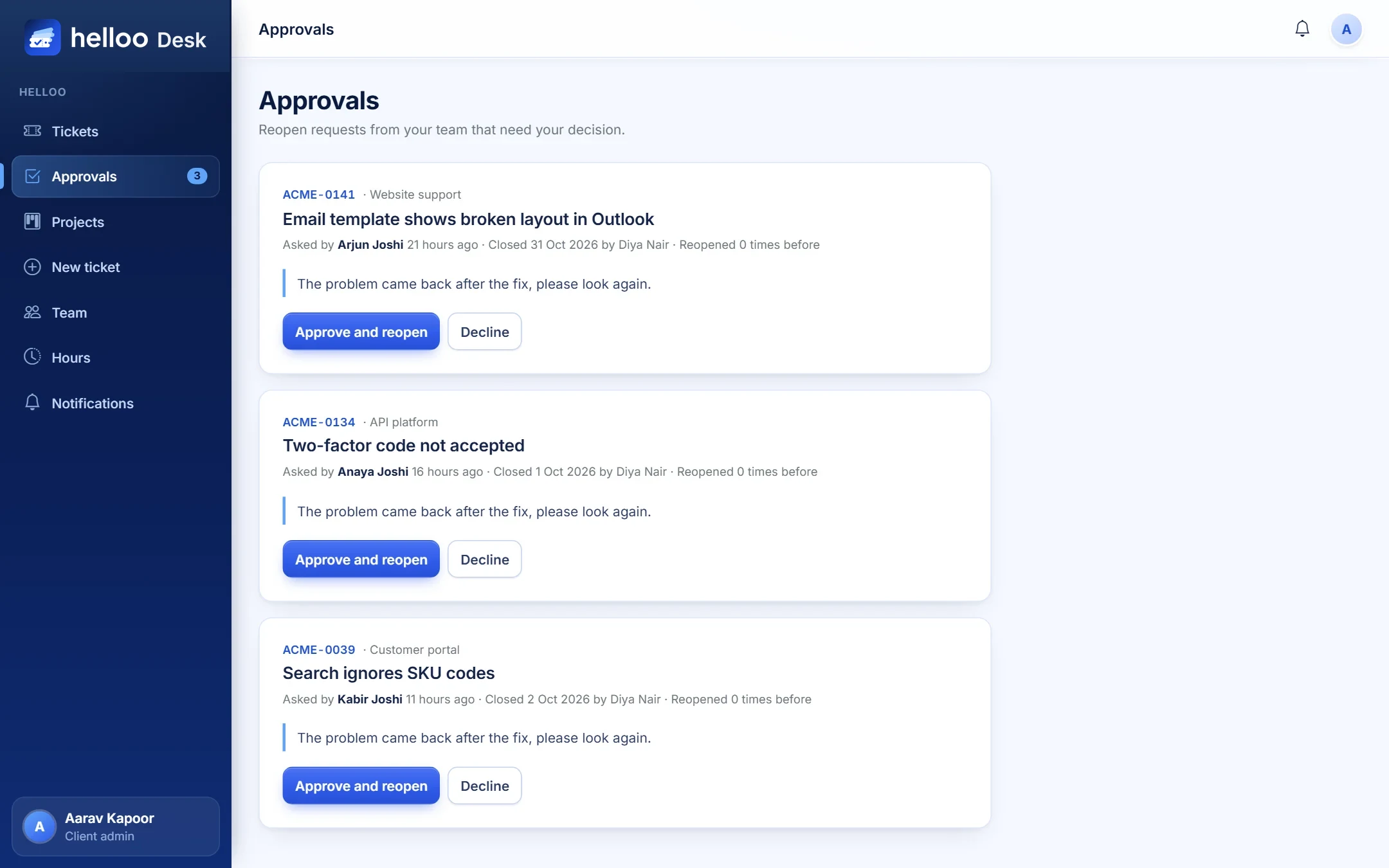
Not quite right? Reopen it. The client asks with a reason, their own admin approves, and the ticket returns to a project manager. The full history stays on the ticket and a fresh service-level clock starts.
Features
Everything a service team needs. Nothing it does not.
Built around the way support and delivery teams really work with their clients.
A board your whole team understands
Lists are columns, tickets are cards. Colours show priority, due dates turn red when late, and each project keeps its own lists and priorities.
Service levels with live timers
Set response and resolution targets for four severities. Tickets show Within, At Risk, Breached or Met.
P1
P2
P3
P4
Two conversations, kept apart
Talk to the client and think out loud with your team on the same ticket, with no risk of mixing them up.
Visible to clientWe found the cause and are fixing it now.
Internal noteRegex breaks on older Safari. Check QA build.
Honest time tracking
Each person logs hours and minutes with a note. Entries are never edited or deleted, so reports can be trusted.
RRohan M.Developer2.5 h
DDiya M.Consultant1.5 h
KKabir M.Consultant1 h
Smart project locks
While a project is live, its lists stay steady so reports match what was promised. Every lock explains itself.
UpcomingEdit freely
LiveAdd only
EndedEdit freely
Client approvals built in
A client user can ask to reopen a closed ticket. Their company admin approves or declines it, with a note, from one tidy screen.
Reports that build themselves
See hours by person, project, role or client. Download the lot as an Excel file in one click.
The right people hear, at the right time
Email and in-app alerts for new tickets, assignments, replies, closures and service-level warnings.
Files, safely
Drag in screenshots and documents. Files are private, checked on upload, and only open for people who may see the ticket.
Works in your client’s time zone
Service-level clocks, working hours and holidays follow each client’s own calendar.
Who it is for
One system. The right view for everyone.
After sign-in, each person lands on the screen they need most.
Ask once. Follow along.
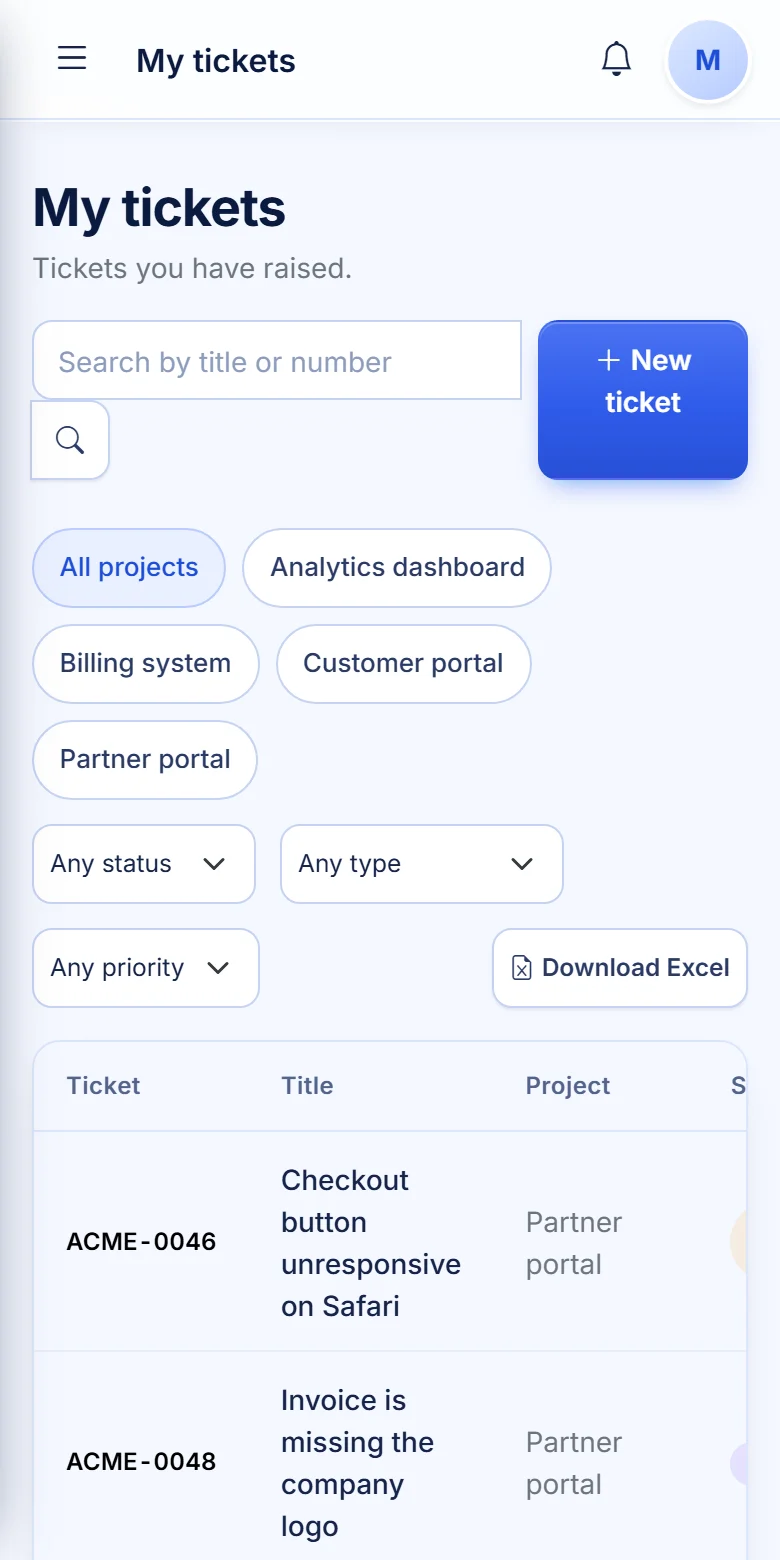
Raise a request, see who is working on it and read every reply, without ever digging through your inbox.
Raise tickets for your projects in a minute
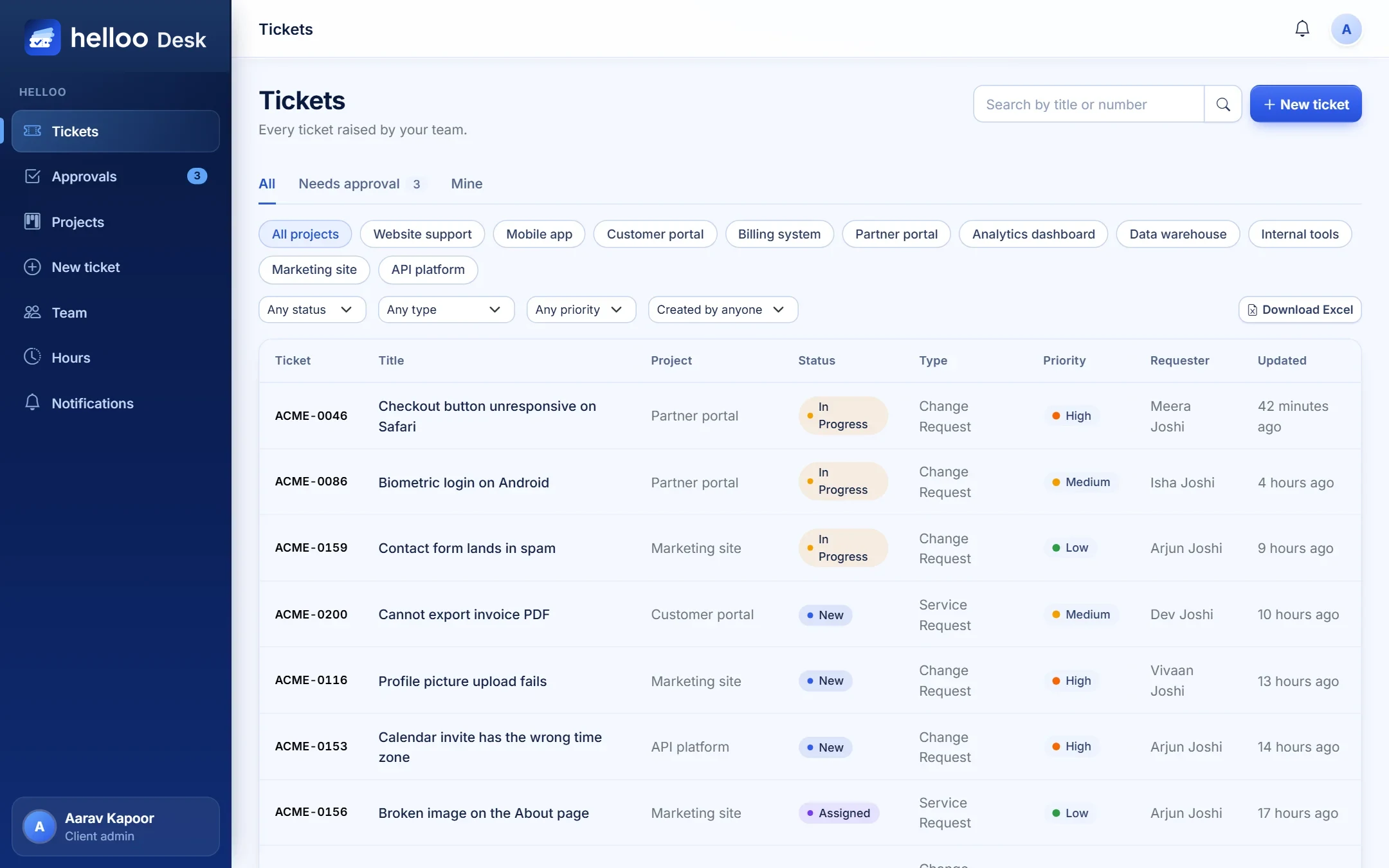
See only your own tickets, filter and export them
Reply to the team and attach files
Request a reopen if a fix did not stick
Lands on /tickets
Your company, in control.
Client admins see every ticket from their company, approve reopen requests and look after their own team.
Whole-company view with an approvals badge
Approve or decline reopen requests
Invite colleagues one by one or from a CSV file
Choose which projects each person can use
Lands on /tickets
See what needs you, first.
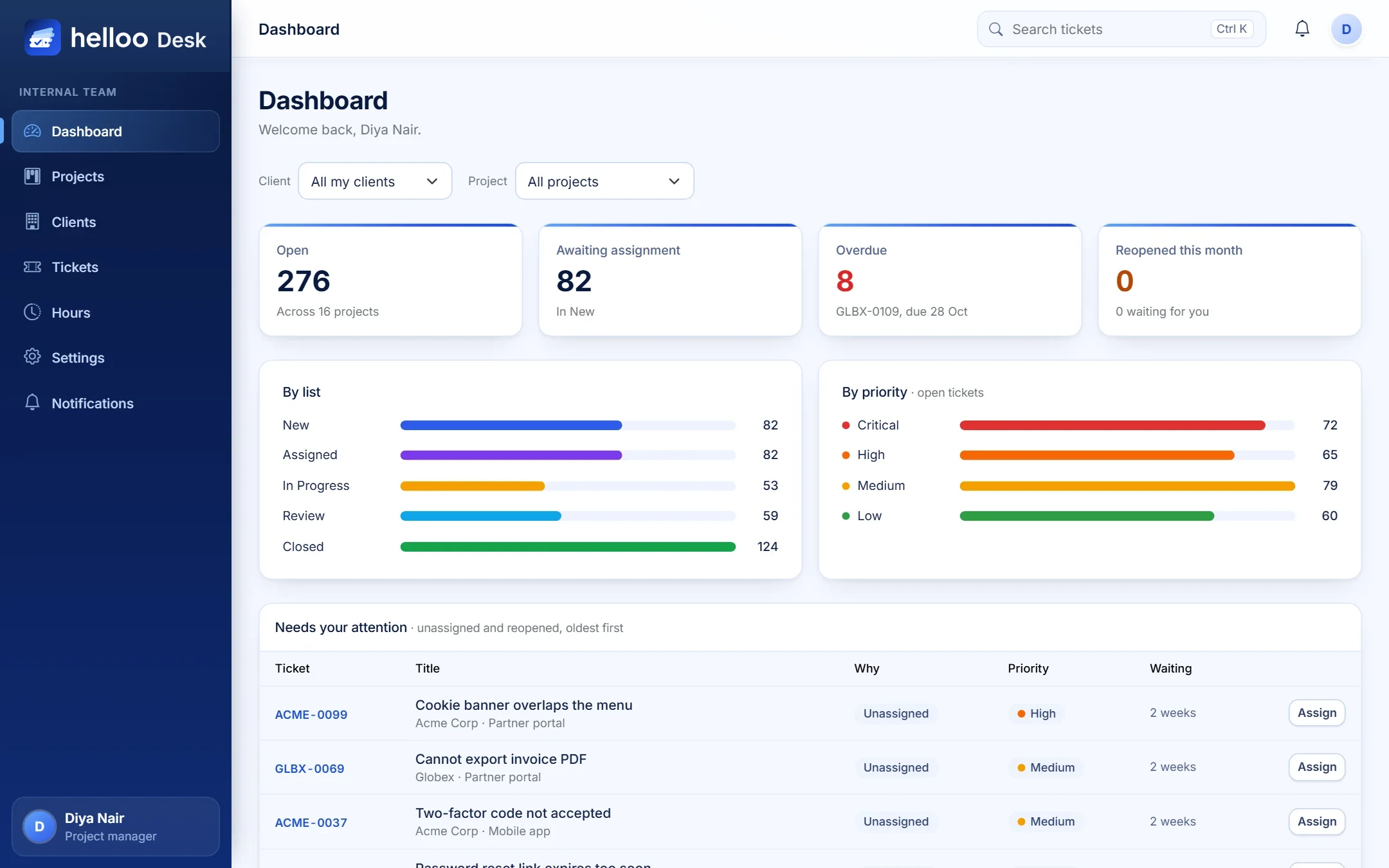
Project managers get a dashboard of what is open, overdue and waiting for an owner, then act on it in two clicks.
“Needs your attention” list, oldest first
Create clients and projects, invite consultants
Assign people, close tickets, reopen when needed
Hours reports with Excel export
Lands on /dashboard
Focus on the work.
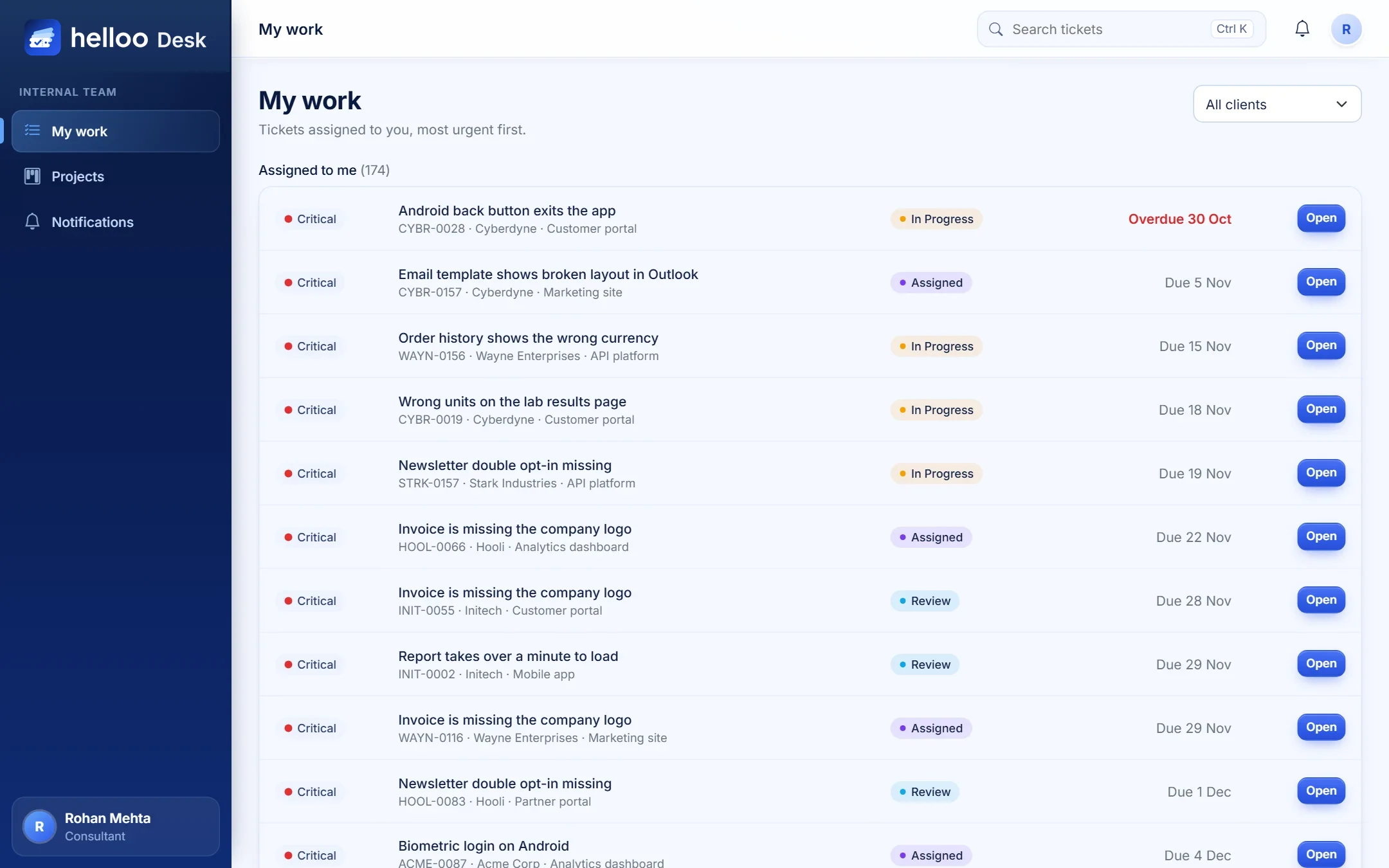
Consultants and developers open one page and see their tickets, most urgent first. No noise, no clutter.
“My work” list with overdue markers
Reply, add internal notes and log time
Move tickets between lists on the board
Close with a clear resolution note
Lands on /my-work
Anywhere
In the office or on the move
helloo Desk adapts to any screen, so a client can raise a ticket from the train and a manager can approve a reopen from a meeting room.
Fits phones, tablets and desktops
Large, easy-to-tap buttons
Readable colours that meet accessibility contrast
Nothing to install, just open your browser
Security and privacy
Built so clients can trust you with their work
One installation can serve many companies, and each stays strictly apart from the others.
Client isolation
Every query is scoped to the right company. Ask for a ticket you may not see and it simply is not found.
Hidden means hidden
Internal notes, staff emails and time comments never leave the building, not in the page, the email or the data.
Invite-only access
No public sign-up. People join through a personal invitation link that expires after 48 hours.
Private files
Attachments sit on private storage, are checked on upload and are only handed out to permitted people.
A history you can rely on
Tickets and time entries are never deleted, and every closure and reopening is recorded for good.
Roles that make sense
Clear roles with rules enforced on the server, so a hidden button is never the only protection.
Your own workspace
We set it up. You run it.
You do not start from a blank page. We build a dedicated helloo Desk environment for your company, shape it around the way you work, then hand you the keys.
1
A new environment, just for you
Your own helloo Desk, set up from scratch and kept separate from everyone else’s.
2
Shaped around your team
Roles, workflows, forms, fields and branding, all configured with you.
3
Your people invited
Your first administrators and users receive their invitations and can start straight away.
4
Full admin access, yours to keep
You control users, settings and what each person can see. Change anything, any time.
Questions
Good to know before you start
How do I get an account?
helloo Desk is invite-only. Your project manager or your company’s admin sends an invitation by email. Open the link, choose a password and you are in. If you are new to us, use “Request a demo” and we will get back to you.
Do we get our own setup?
Yes. We set up a dedicated helloo Desk environment for your company, configure it with you and give you full admin access, so you can manage users, clients, projects and settings yourself.
What can I raise a ticket for?
Anything you need from the team. Choose Issue for something that is broken, Service Request when you need help or access, or Change Request when you want something modified.
Can I see how many hours were spent?
That is up to your service provider. They can switch on hours sharing for your company, either for admins only or for everyone, and choose whether staff names are shown. Individual time comments always stay private.
What if the fix does not work?
Ask to reopen the ticket and explain why. Your company admin approves the request, and the ticket goes back to a project manager with its full history intact.
Will I get notified?
Yes. You get an email and an in-app notification when a ticket is received, when the team replies and when it is closed.
Does it work on my phone?
Yes. helloo Desk works in any modern browser on phones, tablets and computers. There is nothing to install.
Request a demo
Ready to see your work clearly?
New to helloo Desk? Tell us about your team and we will set up your own workspace, ready to use, with full admin access for you.
30-minute live walkthrough
Your own workspace, set up with you
English and Arabic
Every ERP. One helloo.
Thank you — request received
We will contact you within one working day to confirm a demo slot.